
文章摘要 FakeGPT
加载中...|
Python 爬虫入门实战
爬虫本质就是"用程序代替浏览器去访问网页并提取数据"。Python 因为语法简单、库生态好,是写爬虫最主流的语言。这篇带你跑通第一个完整的爬虫。
注意:爬虫只能抓取公开可访问的数据,并遵守目标网站的 robots.txt 和服务条款,不要对个人网站高频请求。用于学习、个人用途,别做商业滥用。
环境准备
bash
pip install requests beautifulsoup4 lxml三个库各司其职:requests 发请求、BeautifulSoup 解析 HTML、lxml 是更快的解析引擎。
第一步:发起请求
python
import requests

headers = {
    "User-Agent": "Mozilla/5.0 (Windows NT 10.0; Win64; x64) AppleWebKit/537.36",
    "Referer": "https://example.com/",
}

# 带 headers 模拟浏览器,很多站会拦截裸 requests
resp = requests.get("https://example.com/posts", headers=headers, timeout=10)
resp.raise_for_status()          # 状态码非 200 直接抛异常
resp.encoding = resp.apparent_encoding  # 处理中文乱码
print(resp.status_code, len(resp.text))第二步:解析 HTML
python
from bs4 import BeautifulSoup

soup = BeautifulSoup(resp.text, "lxml")

# 找到文章标题列表(以 .item 容器为例)
for item in soup.select(".post-item"):
    title = item.select_one("h2 a").get_text(strip=True)
    link = item.select_one("h2 a")["href"]
    date = item.select_one(".date").get_text(strip=True)
print(title, link, date)常用方法:
soup.select("div.item a"):CSS 选择器,最推荐soup.find("a", class_="title"):找单个元素tag.get_text(strip=True):取纯文本tag["href"]:取属性
第三步:处理翻页
python
for page in range(1, 6):
    url = f"https://example.com/posts?page={page}"
    resp = requests.get(url, headers=headers, timeout=10)
    soup = BeautifulSoup(resp.text, "lxml")
    # ... 解析并保存
    time.sleep(1)  # 控制频率,做有礼貌的爬虫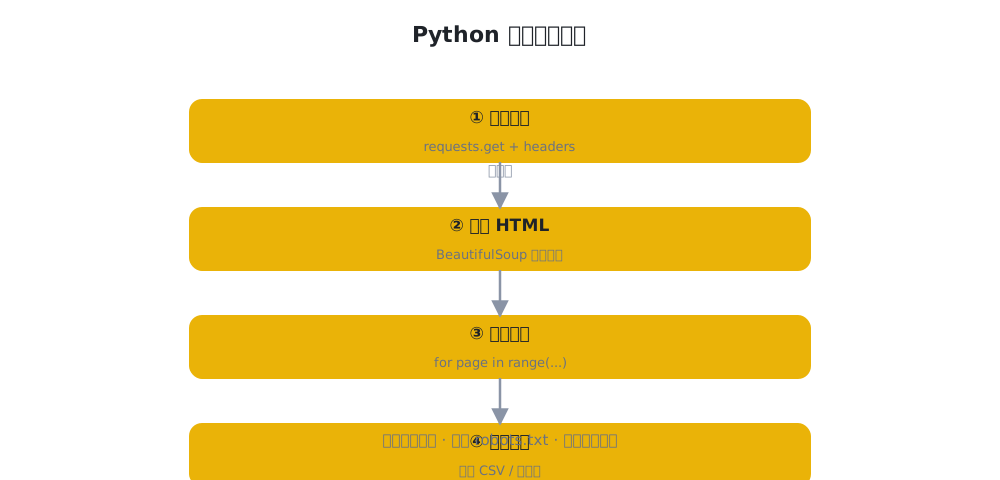
第四步:保存数据
python
import csv

with open("posts.csv", "w", newline="", encoding="utf-8-sig") as f:
    writer = csv.writer(f)
    writer.writerow(["标题", "链接", "日期"])
writer.writerow([title, link, date])utf-8-sig 带 BOM,Excel 打开中文不乱码。
完整实战:抓取博客文章列表
python
import requests, time, csv
from bs4 import BeautifulSoup

headers = {"User-Agent": "Mozilla/5.0"}
results = []

for page in range(1, 3):
    url = f"https://xkbk.cn/archives?page={page}"
    resp = requests.get(url, headers=headers, timeout=10)
    soup = BeautifulSoup(resp.text, "lxml")

    for item in soup.select(".post-item"):
        a = item.select_one("h2 a")
        if not a:
            continue
        results.append({
            "title": a.get_text(strip=True),
            "url": a["href"],
            "date": item.select_one(".date").get_text(strip=True),
        })
    time.sleep(1)

print(f"共抓取 {len(results)} 条")
for r in results[:5]:
    print(r)

with open("posts.csv", "w", newline="", encoding="utf-8-sig") as f:
    writer = csv.DictWriter(f, fieldnames=["title", "url", "date"])
    writer.writeheader()
writer.writerows(results)遇到反爬怎么办
先别急着上 Selenium,按顺序尝试:
- 加 User-Agent 和 Referer(解决 80% 的拦截)
- 控制请求频率:
time.sleep(1-3)随机间隔 - 用 Session 保持 Cookie:
requests.Session(),先 GET 一次拿到 cookie - 检查是否有接口:很多站有 JSON API,直接抓接口比解析 HTML 轻松得多
python
session = requests.Session()
session.get("https://example.com/")          # 拿 cookie
resp = session.get("https://example.com/api/posts", headers=headers)
data = resp.json() # 直接是 JSON小结
爬虫四步走:请求 → 解析 → 翻页 → 保存。用 requests + BeautifulSoup 能解决大部分静态网页;动态页面(JS 渲染)再考虑 playwright 无头浏览器。记住礼貌抓取,别给目标网站造成压力。
Python 爬虫入门实战:requests + BeautifulSoup 抓取网页https://xkbk.cn/posts/python-spider-guide
评论 匿名评论 隐私政策